When you start researching sim racing, every forum and YouTube video tells you the same thing: The “best” brain for a rig is a PC. They aren’t wrong. With massive processing power, high-end graphics cards, and the ability to run triple-monitor setups, a PC offers the most immersive experience and endless hardware combinations.
But let’s be real—I’m trying to keep this to a budget. I’m also new to this; who’s to say I’ll even like the experience in six months? Since I managed to snag an extra PS5 for under $200, I decided that would be my starting point. It’s powerful, reliable, and significantly cheaper than a dedicated gaming PC.
The $1,000 Challenge
I set a strict budget of $1,000 for the hardware. In my mind, the bulk of that money should go toward the steering wheel and pedal combination. That’s where the “real” feeling of driving comes from, right?
I started my search at Microcenter. They had the Logitech G923 on display, and while it looked okay, the moment I touched it, I was disappointed. It felt… “toy-ish.” It didn’t have the weight or the resistance of a true steering wheel, and I knew right then that I wouldn’t stay satisfied with it for long.
The Direct Drive Dilemma
After hours of research, I realized that Direct Drive (DD) was the only way to go. Instead of using gears or belts to turn the wheel, the wheel is mounted directly to the motor shaft. This provides instant, high-fidelity feedback. The problem? They are expensive, and PS5 compatibility is surprisingly rare.
- Fanatec: A great option, but very “a la carte.” By the time I added load-cell brakes and the specific PlayStation-compatible base, the price skyrocketed.
- Logitech G Pro: Beautiful hardware, but at over $1,000 for the set, my entire budget would be gone before I even bought a seat.
Finding the Middle Ground: The Logitech RS50
Then I found the Logitech RS50 (the Racing Series 8Nm base). At around $700 shipped, it felt like the “Goldilocks” solution. Since I’m primarily focused on F1 racing, I didn’t need a dedicated shifter or a clutch pedal, which kept the cost down.
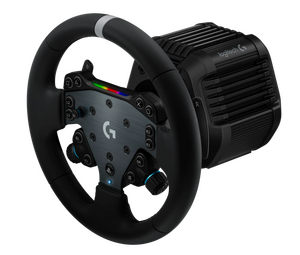
The RS50: Pros and Cons
If you’re looking at this base for your own PS5 setup, here is what I’ve discovered:
The Advantages
- TrueForce Technology: This is a game-changer. It uses the game’s audio and physics to send high-frequency vibrations through the wheel. You don’t just feel the turn; you feel the engine’s RPM and the specific “thump” of the F1 curbs.
- 8Nm of Torque: This is the “sweet spot.” It’s strong enough to provide a realistic struggle in high-speed corners without being so powerful that it hurts your wrists or requires a professional-grade steel chassis.
- Natively PlayStation: No adapters, no workarounds. It just works.
The Disadvantages
- Ecosystem Locking: You are mostly tied to Logitech’s ecosystem. If you want a specific third-party rim, you’ll likely need expensive adapters.
- Build Materials: To hit that price point, there is more plastic involved than in the ultra-premium $1,500 bases. It’s sturdy, but it doesn’t have that “industrial tool” feel.
- Fixed Power: Unlike some competitors where you can buy a larger power brick later to increase the strength, the RS50 is fixed at 8Nm. What you buy is what you get.
Next Steps
By choosing the RS50, I’ve managed to secure a high-end Direct Drive experience while keeping $300 left in the bank. Now comes the next challenge: What do I bolt this thing to?